
The Samsung Galaxy A54 5G comes with built-in eSIM support, making it easier than ever to set up mobile connectivity without relying on a physical SIM card.
With an eSIM, you can activate a mobile plan digitally, switch between plans more conveniently, and prepare your device before your trip without visiting a store or waiting for a SIM card to arrive.
If you've purchased an iRoamly eSIM, getting started only takes a few minutes. Whether you received a QR code or manual activation details, the Galaxy A54 5G provides a straightforward setup process through its SIM Manager settings.
In this guide, you'll learn how to install your iRoamly eSIM, verify that it was added successfully, and configure the settings needed to start using mobile data when your plan becomes active.

Stay Connected Abroad with iRoamly
iRoamly is a travel eSIM service that provides mobile data plans for destinations around the world. Travelers can choose available local, regional, and global options, with data allowances, validity periods, and plan features varying by destination.
Once installed on a compatible phone, the data line can support everyday travel needs such as maps, messaging, translations, ride-hailing, bookings, and travel updates.
On a compatible Samsung Galaxy A54 5G, an iRoamly eSIM can be added digitally and selected for mobile data during a trip. The instructions below keep the existing QR-code and manual-entry setup paths in order so you can install the profile and configure the phone from SIM Manager settings.
Preparations Before Setting Up iRoamly eSIM
Connect the Galaxy A54 5G to stable Wi-Fi.
Confirm your phone is unlocked and supports eSIM in your region/carrier variant.
Keep your iRoamly QR code or manual activation details ready.
Heading to Japan or France? Install the travel eSIM 1-2 days before travel when appropriate, but do not delete it casually after installation.
iRoamly eSIM validity starts from activation; check your specific plan details for the exact activation trigger.
iRoamly travel eSIM plans may not include voice calls or SMS. Availability varies by plan.
Note: The Galaxy A54 5G is available in multiple regional variants, including SCG21, SC-53D, SM-A546B/DS, SM-A546S, and SM-A546U1. eSIM support may vary by model, carrier, and software version. Check your device specifications and SIM Manager settings before purchasing an eSIM plan.
Shared Setup Steps
Open Settings, then tap Connections.
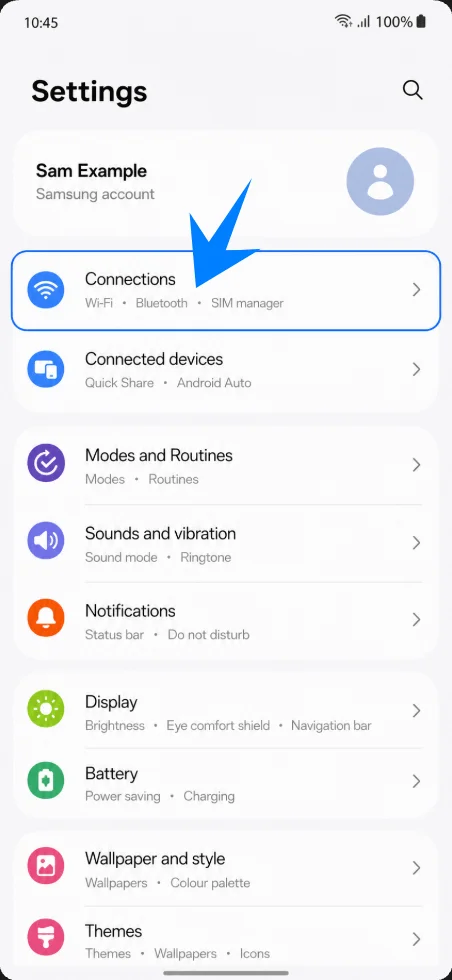
On the Connections screen, tap SIM manager.
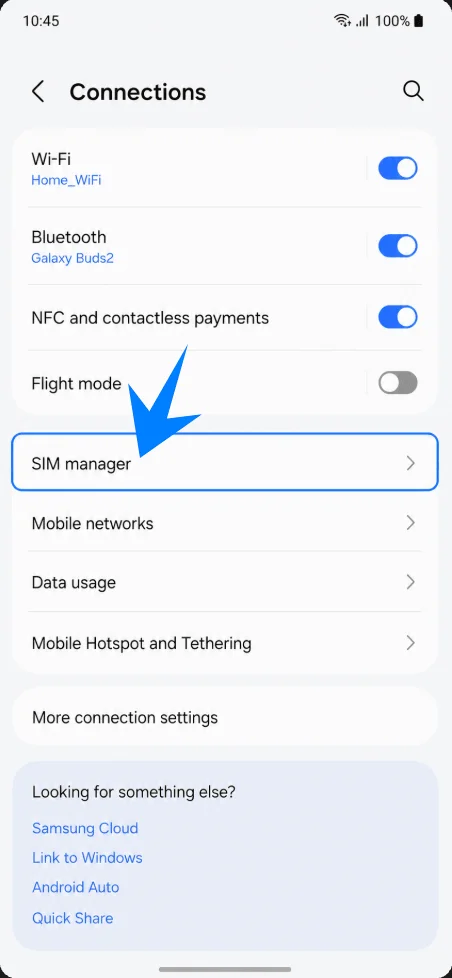
In SIM manager, tap Add eSIM.
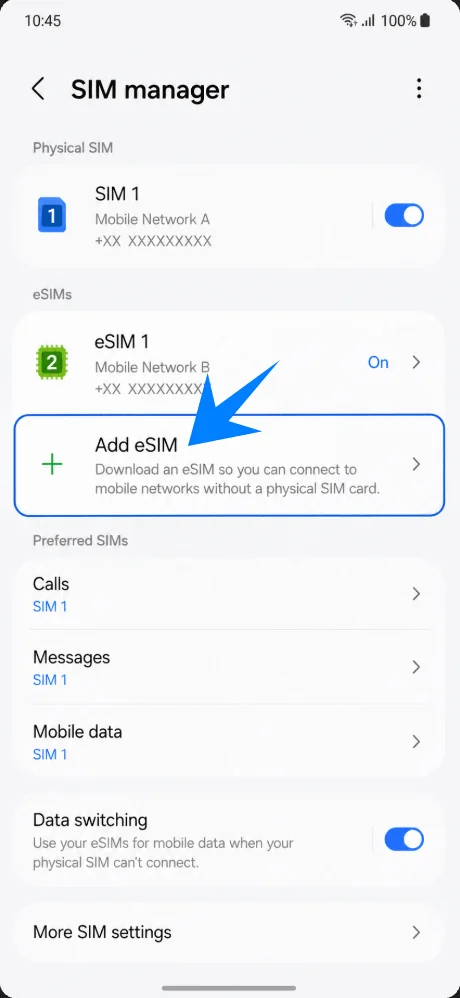
Method 1: Install the iRoamly eSIM by Scanning a QR Code
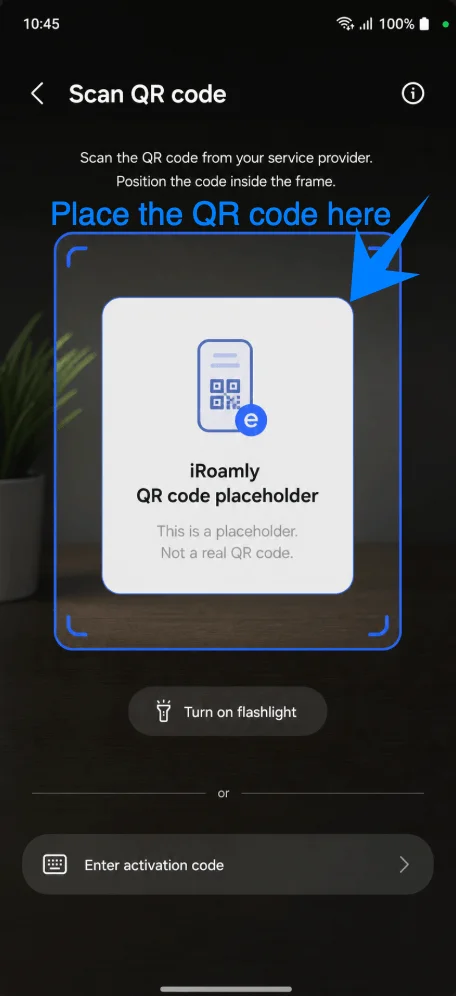
On the Add eSIM screen, tap Scan QR code.
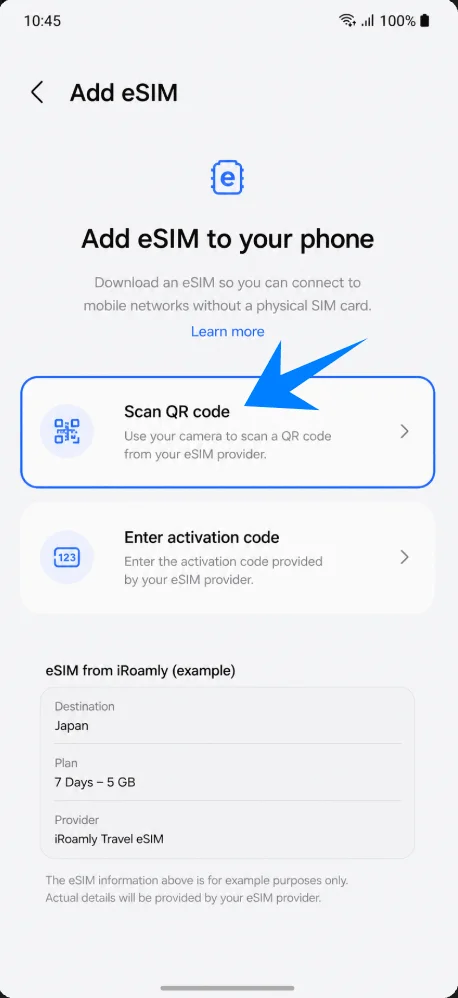
Point the camera at the iRoamly QR code. Keep the code inside the scanner box until the phone detects the eSIM.
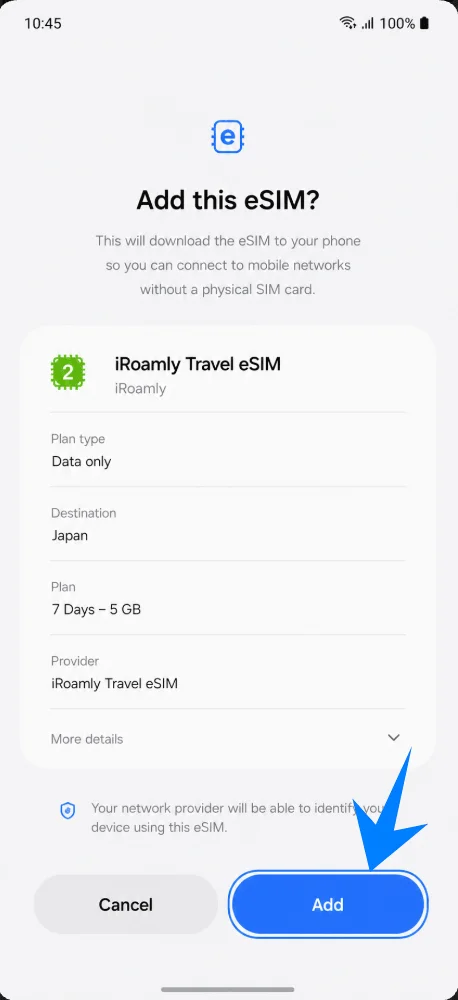
When iRoamly Travel eSIM appears, tap Add or Download, then wait for the eSIM profile to finish installing.
Method 2: Install the iRoamly eSIM by Manual Entry
Complete the shared setup path again: open Settings, tap Connections, tap SIM manager, then tap Add eSIM.
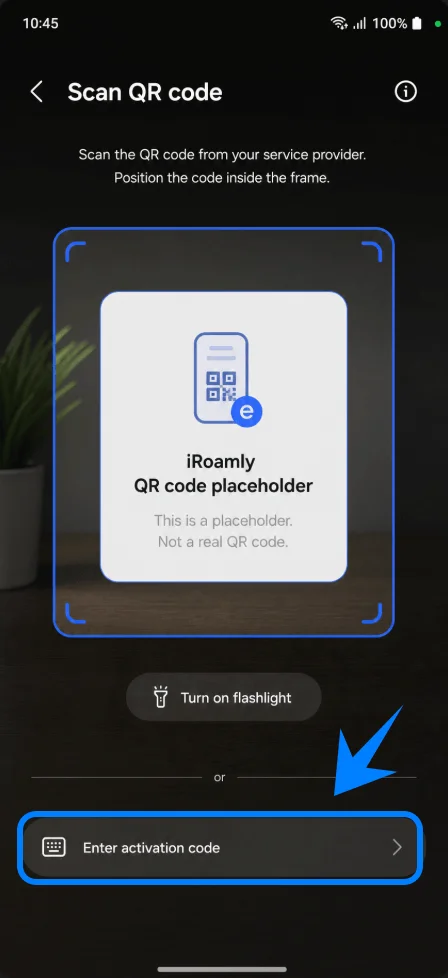
On the Add eSIM screen, tap Enter activation code.
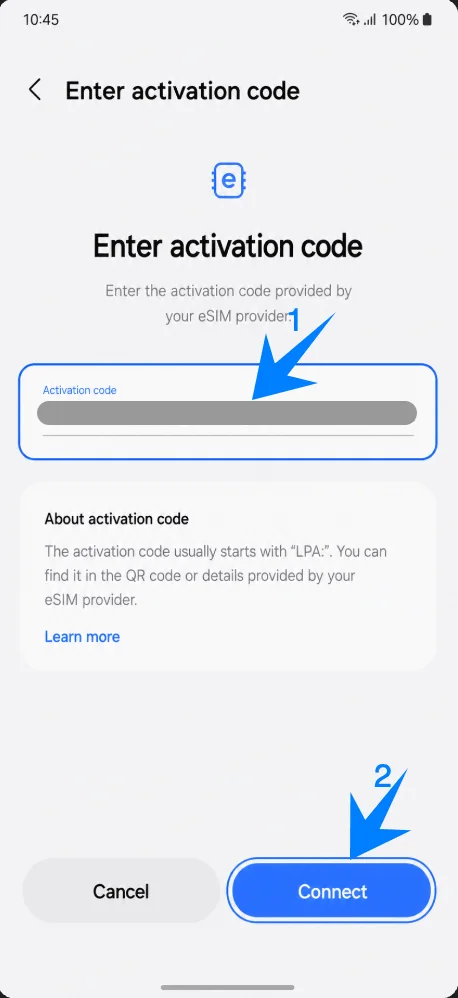
Enter the full iRoamly activation code string in the Activation code field, then tap Connect or Add. Samsung’s manual flow uses one full activation-code string, commonly in LPA:1$... format.
How to Confirm the iRoamly eSIM Was Installed
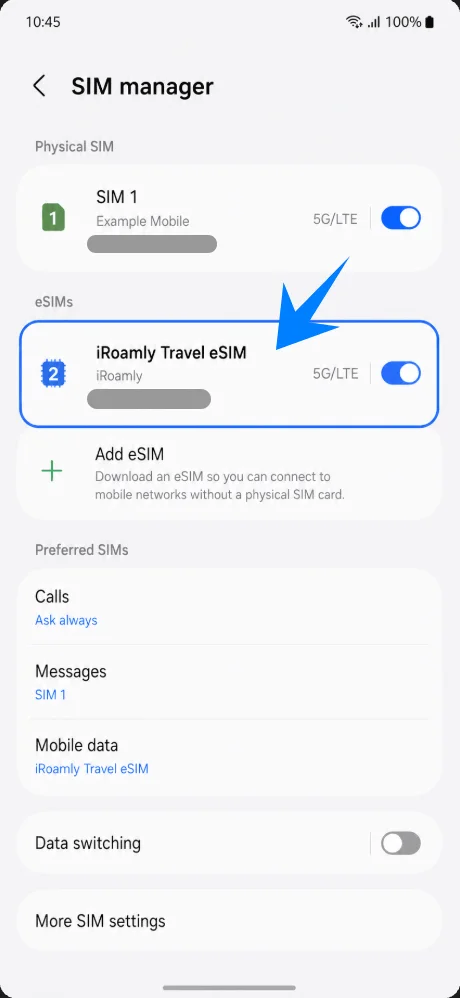
Go back to Settings > Connections > SIM manager. Confirm iRoamly Travel eSIM appears under eSIMs and is switched on.
Set Up the iRoamly eSIM for Travel Data
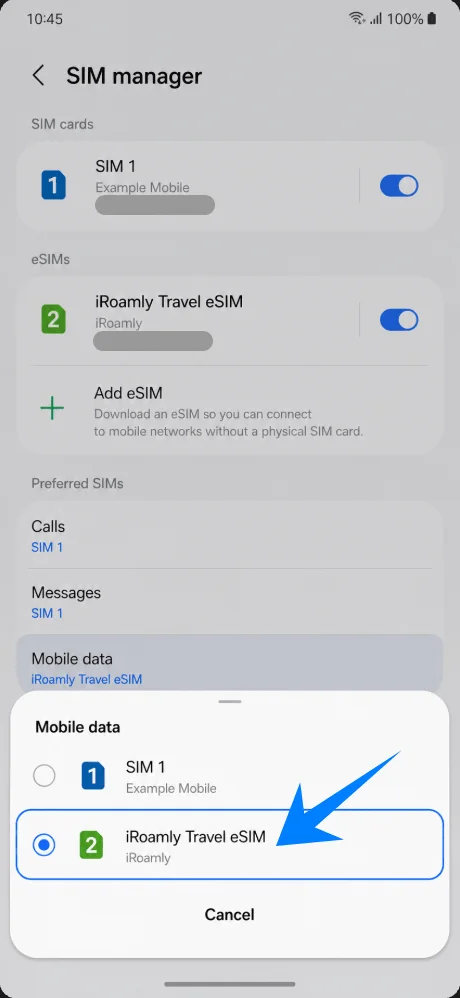
In SIM manager, tap Mobile data, then choose iRoamly Travel eSIM.
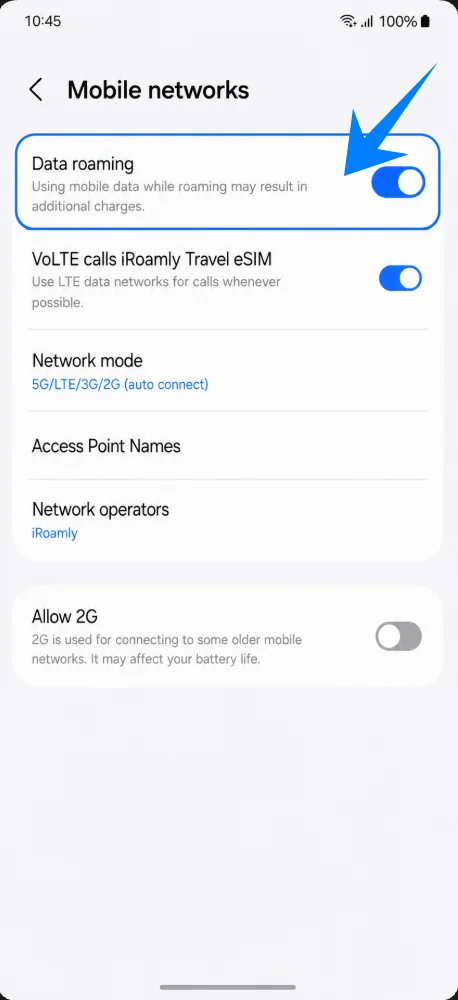
Open Settings > Connections > Mobile networks, then turn on Data roaming if your iRoamly plan or destination requires roaming.
Troubleshooting
No Add eSIM: update One UI, check that the phone is unlocked, confirm your regional Galaxy A54 5G variant supports eSIM, and look for an EID in phone information.
QR code already used or will not scan: try manual entry with the full activation code from iRoamly. Most eSIM QR codes cannot be reused after successful installation.
Installed but no data: select iRoamly Travel eSIM for Mobile data, enable Data roaming, restart the phone, and confirm the plan covers your destination.
Activation pending: stay on Wi-Fi, wait a few minutes, and avoid deleting the eSIM while the phone is provisioning it.
Voice/SMS unavailable: check your exact iRoamly plan. Many travel eSIMs are data-only.
More Samsung Galaxy eSIM Setup Guides
Setting up another Samsung phone? These eSIM activation guides may help.
Conclusion
By following the steps above, you can install and configure your iRoamly eSIM on the Galaxy A54 5G with minimal effort. Once the profile is active and your device settings are configured correctly, you'll be ready to use your plan based on its coverage and activation conditions.
Taking a few minutes to complete the setup before your trip can help ensure a smoother experience and make it easier to stay connected wherever your travels take you.