
The Motorola Razr 2022 is a foldable Android phone with eSIM support on compatible regional and carrier variants. This guide assumes the phone is running Motorola's mostly stock Android 12 or Android 13 software, where the eSIM path normally starts from Settings > Network & internet > SIMs.
Travelers may install an iRoamly travel eSIM before a trip so mobile data is ready without swapping the main physical SIM. Menu wording can vary slightly by software version, region, and carrier firmware, so check that your Razr 2022 shows an Add SIM, Add eSIM, or Download a SIM instead option before you begin.
The steps below cover both installation paths: scanning the iRoamly QR code and entering the manual activation details. Use the QR code if you have another screen to display it; use manual entry if the QR code is on the Razr 2022 itself or the scanner cannot read it.
Travel with Mobile Data from iRoamly
iRoamly eSIM is a travel eSIM service that provides mobile data plans for trips abroad. Travelers can choose destination, local, regional, or global options, with available data allowances, validity periods, plan types, and features varying by destination.
After installation on a compatible phone, that travel data can support everyday needs such as maps, messaging, ride-hailing, bookings, and travel updates.
On a compatible Motorola Razr 2022, iRoamly can be installed as a separate travel-data eSIM while the phone keeps its existing SIM setup.
The instructions below continue with the device-specific QR-code and manual-entry steps, then show how to confirm the profile and select it for mobile data when you are ready to use the plan abroad.
Before You Set Up Your iRoamly eSIM
Connect the Motorola Razr 2022 to stable Wi-Fi before downloading the eSIM.
Confirm that your Razr 2022 variant supports eSIM and is carrier-unlocked for travel use.
Keep your iRoamly QR code or manual setup details ready. Manual setup usually requires an SM-DP+ Address, an Activation code, and sometimes a Confirmation code.
Do not delete an installed eSIM unless iRoamly support tells you to do so. Many travel eSIMs cannot be reinstalled after deletion.
Heading to France or Spain? Installing the travel eSIM before departure can leave less to configure after arrival, while still keeping the line off until the plan is ready to use.
Install the eSIM 1-2 days before travel when possible, but check your exact plan details first. iRoamly plan validity starts from activation; the trigger can vary by plan, such as installation or first connection to a supported destination network.
iRoamly travel eSIM plans may be data-only. Voice calls and SMS availability varies by plan, so check the product page or order details before relying on calls or texts.
Method 1: Install eSIM by Scanning a QR Code
Open the Settings app on your Motorola Razr 2022. You should see the main Android Settings list.
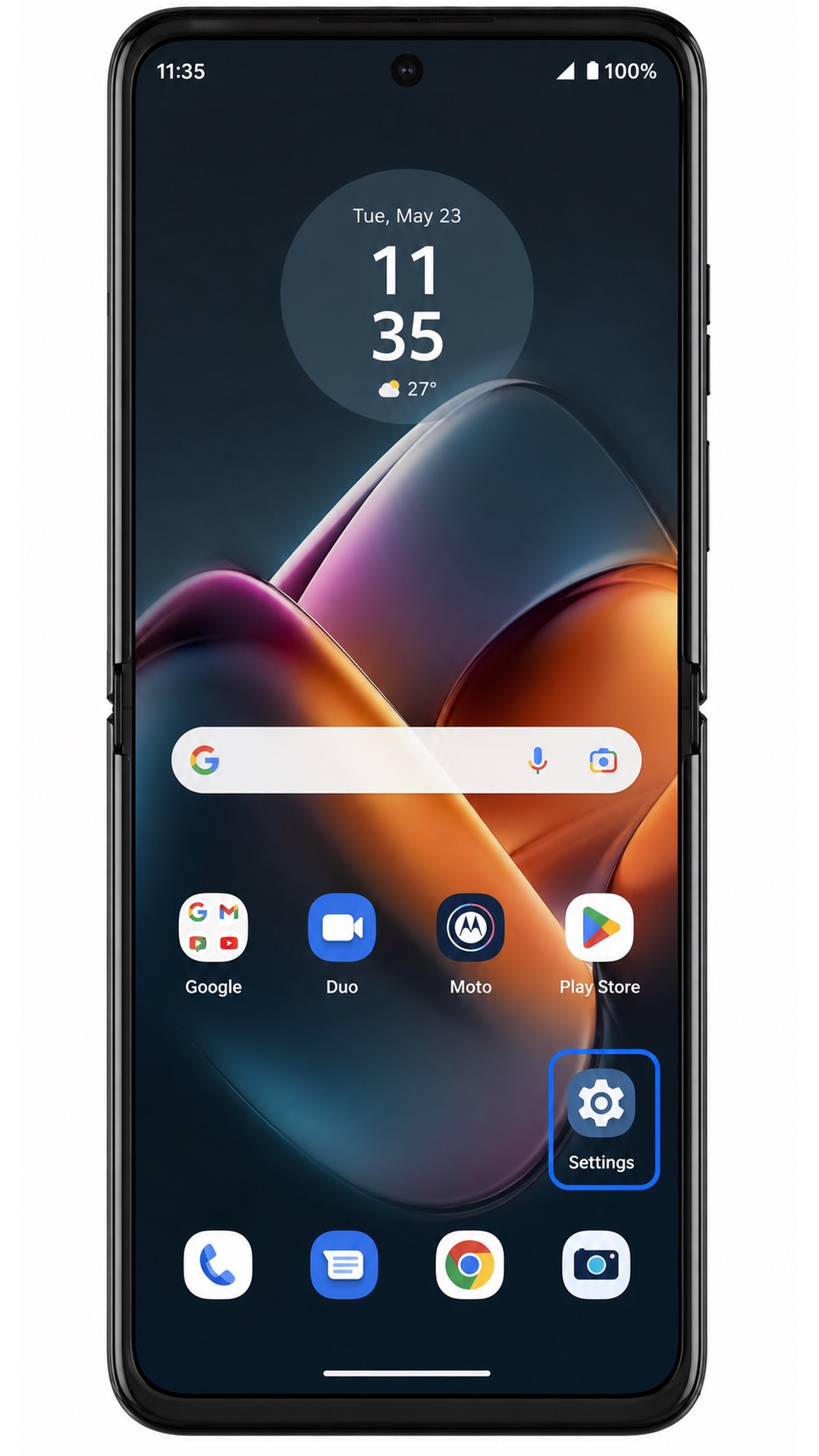
Tap Network & internet. The phone should open the page where Android groups internet, SIM, hotspot, and airplane mode settings.
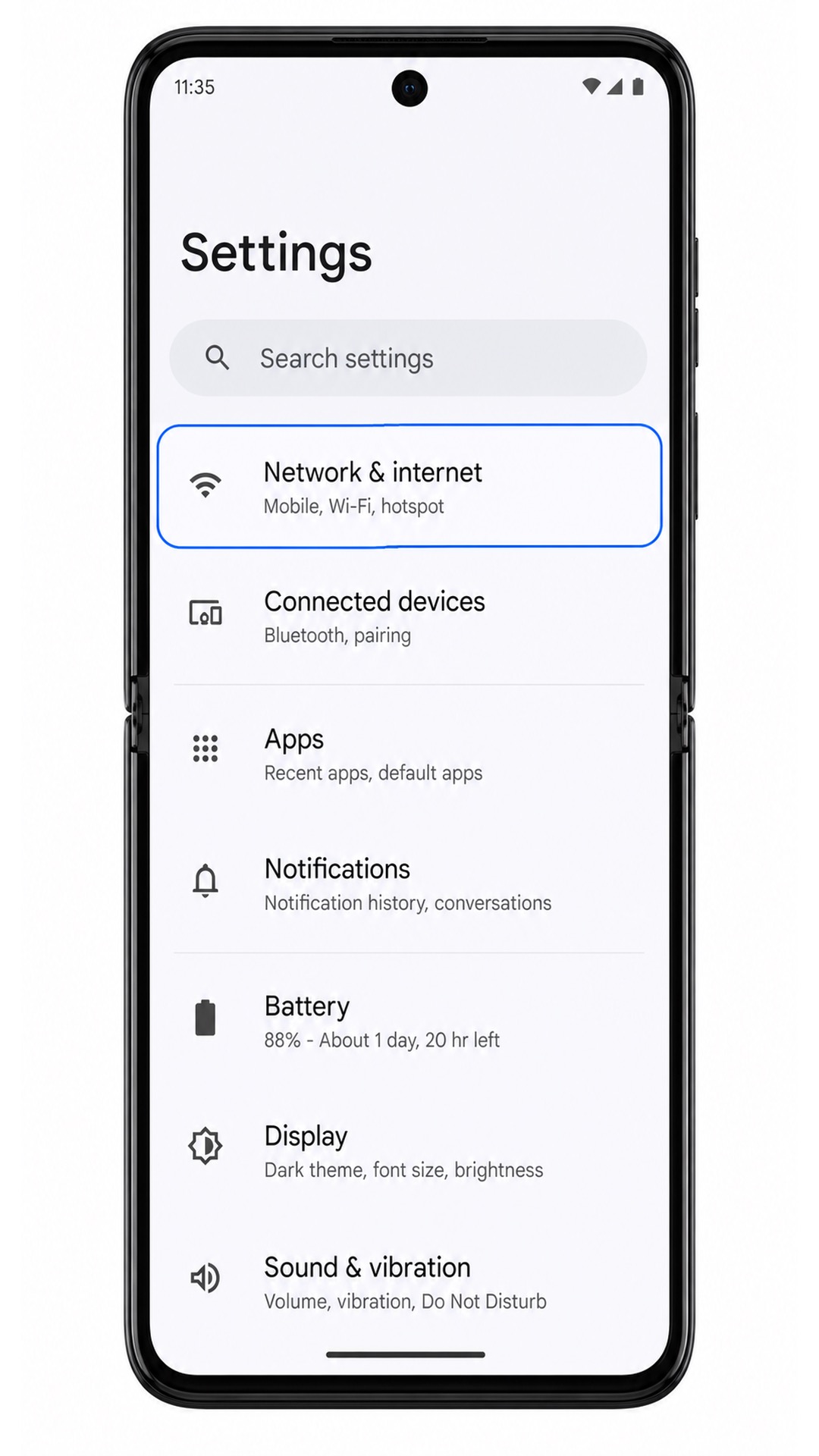
Tap SIMs. On some builds, this page may appear under Mobile network or inside an Internet screen, but the target is the SIM management page.
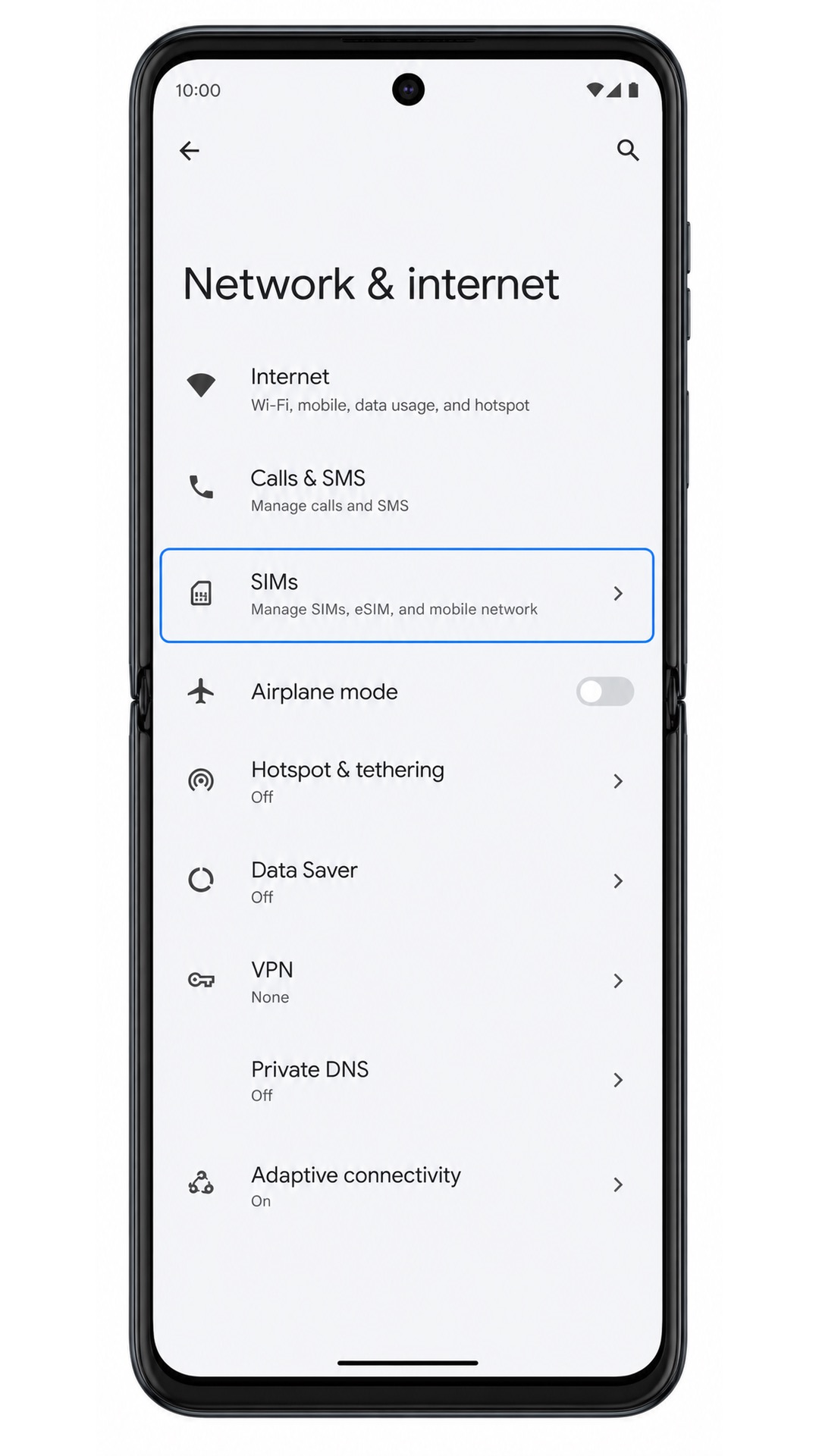
Tap Add SIM, Add eSIM, or the equivalent add option shown on your Razr 2022. The phone should start the flow for adding another mobile plan.
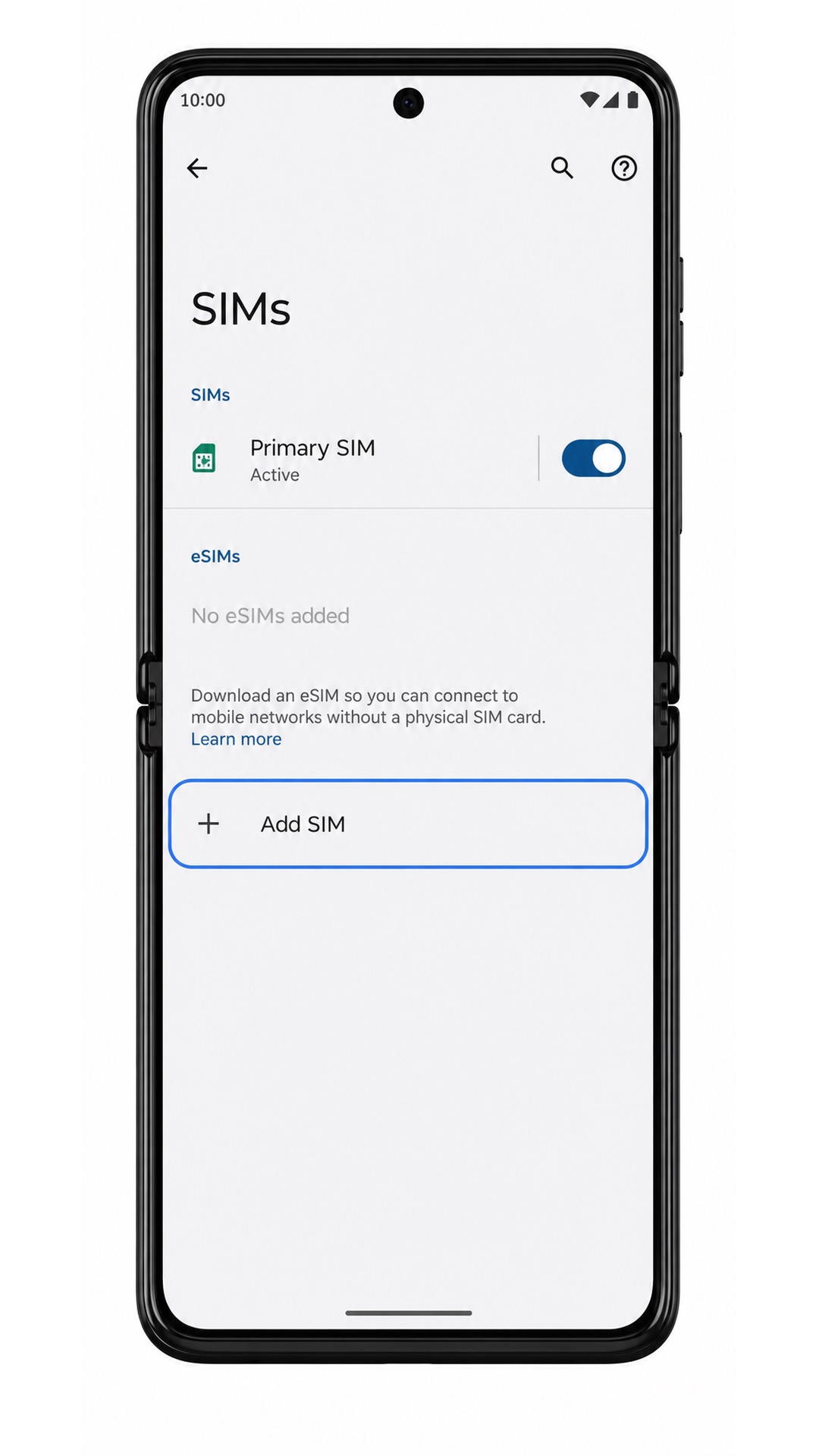
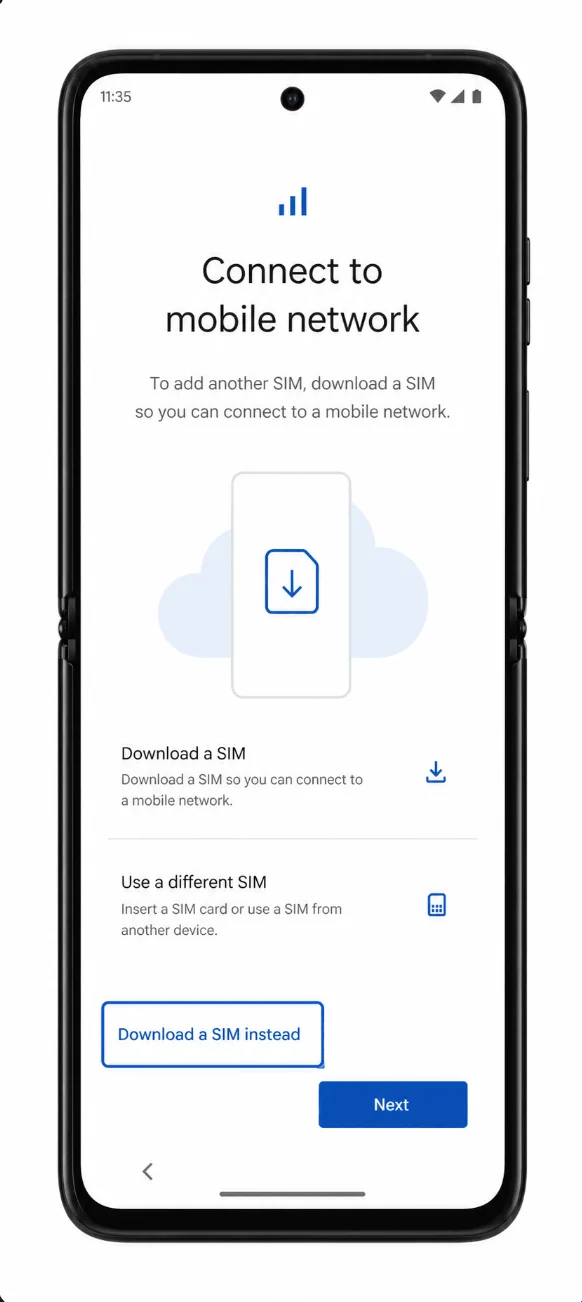
If Android asks how you want to connect, tap Download a SIM instead or continue to the eSIM download option. The next screen should prepare the QR scanner.
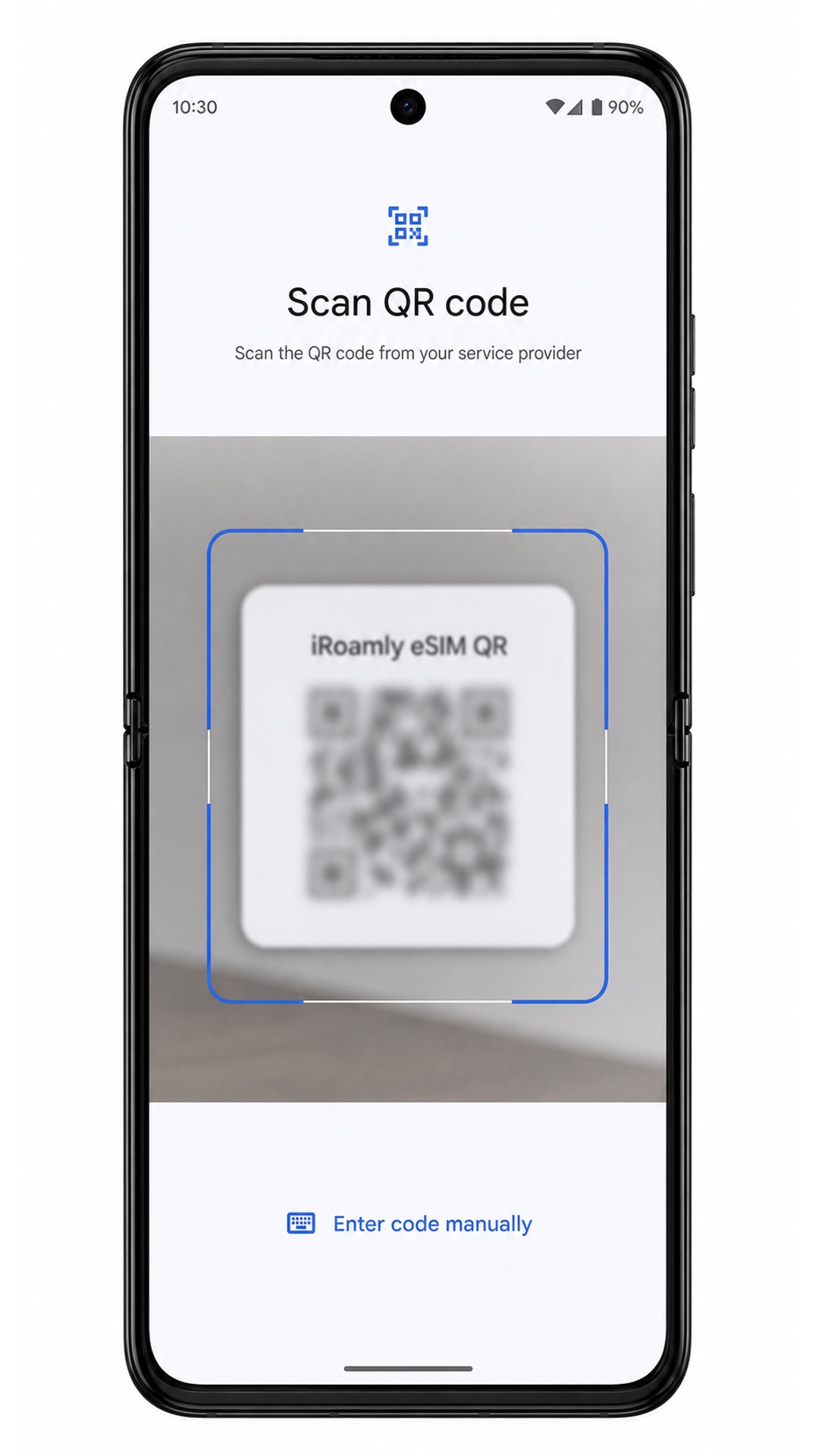
Tap Scan QR code if prompted, then point the Razr 2022 camera at the iRoamly eSIM QR code from your order email or account page. Keep the QR code steady until the phone reads it.
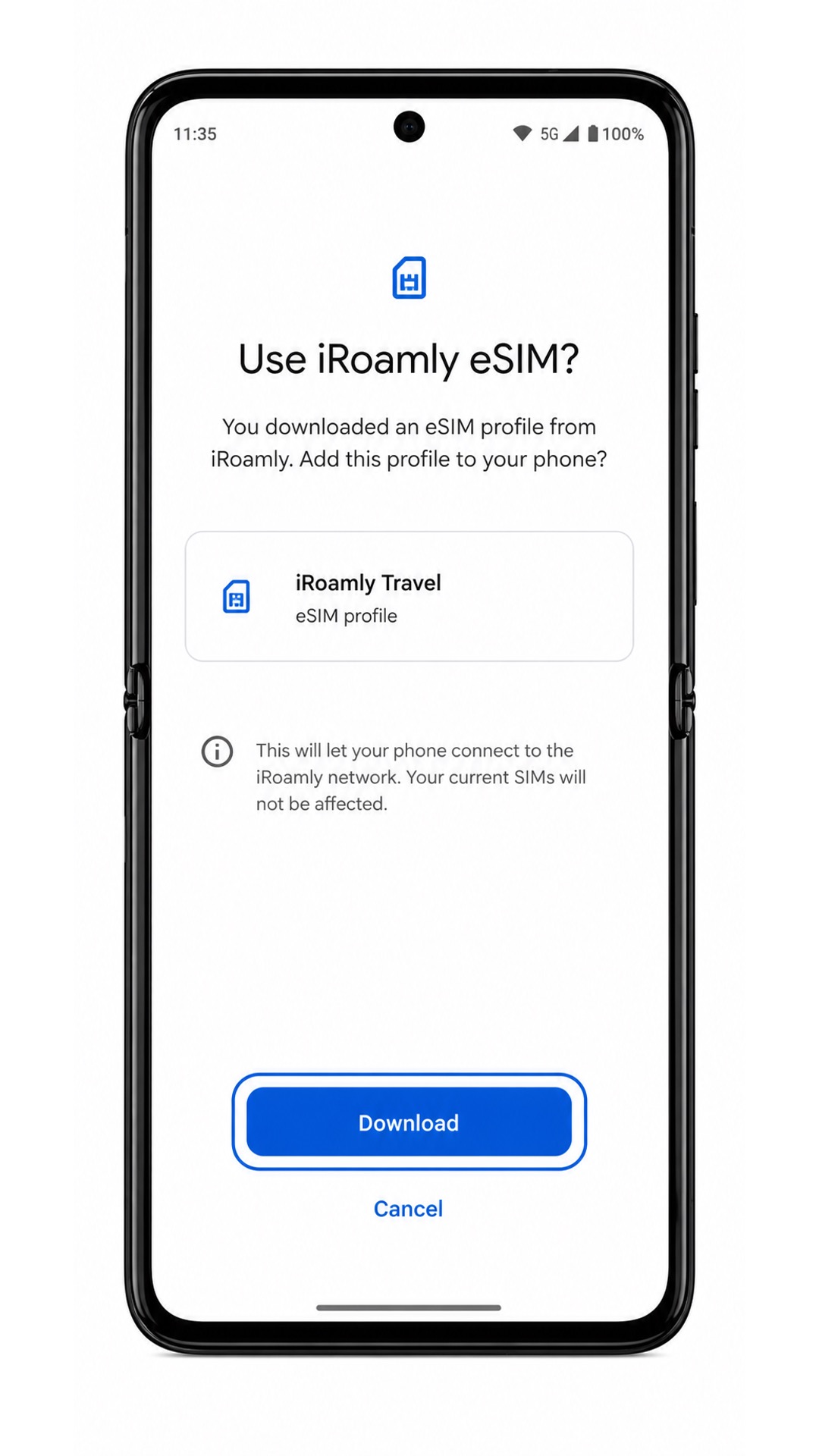
Review the downloaded plan name, then tap Download, Activate, or Add when the Razr 2022 asks you to confirm the iRoamly eSIM. Wait for the setup process to finish before leaving the screen.
Method 2: Install eSIM Manually
Open the Settings app on your Motorola Razr 2022. Start from Settings even if you already tried the QR method, so the manual setup path is clear.
Tap Network & internet. This opens the Android network settings page used for SIM and eSIM setup.
Tap SIMs. The Razr 2022 should show the SIM management area where physical SIMs and downloaded eSIMs are listed.
Tap Add SIM, Add eSIM, or the equivalent add option. The phone should move into the same mobile-plan setup flow used by QR installation.
Tap Download a SIM instead if Android asks whether to use a physical SIM. When the QR scanner appears, look for Enter code manually or Need help?.
Tap Enter code manually, then enter the iRoamly manual details exactly as provided: SM-DP+ Address, Activation code, and Confirmation code if iRoamly gives one. Tap Continue after checking the spelling and punctuation.
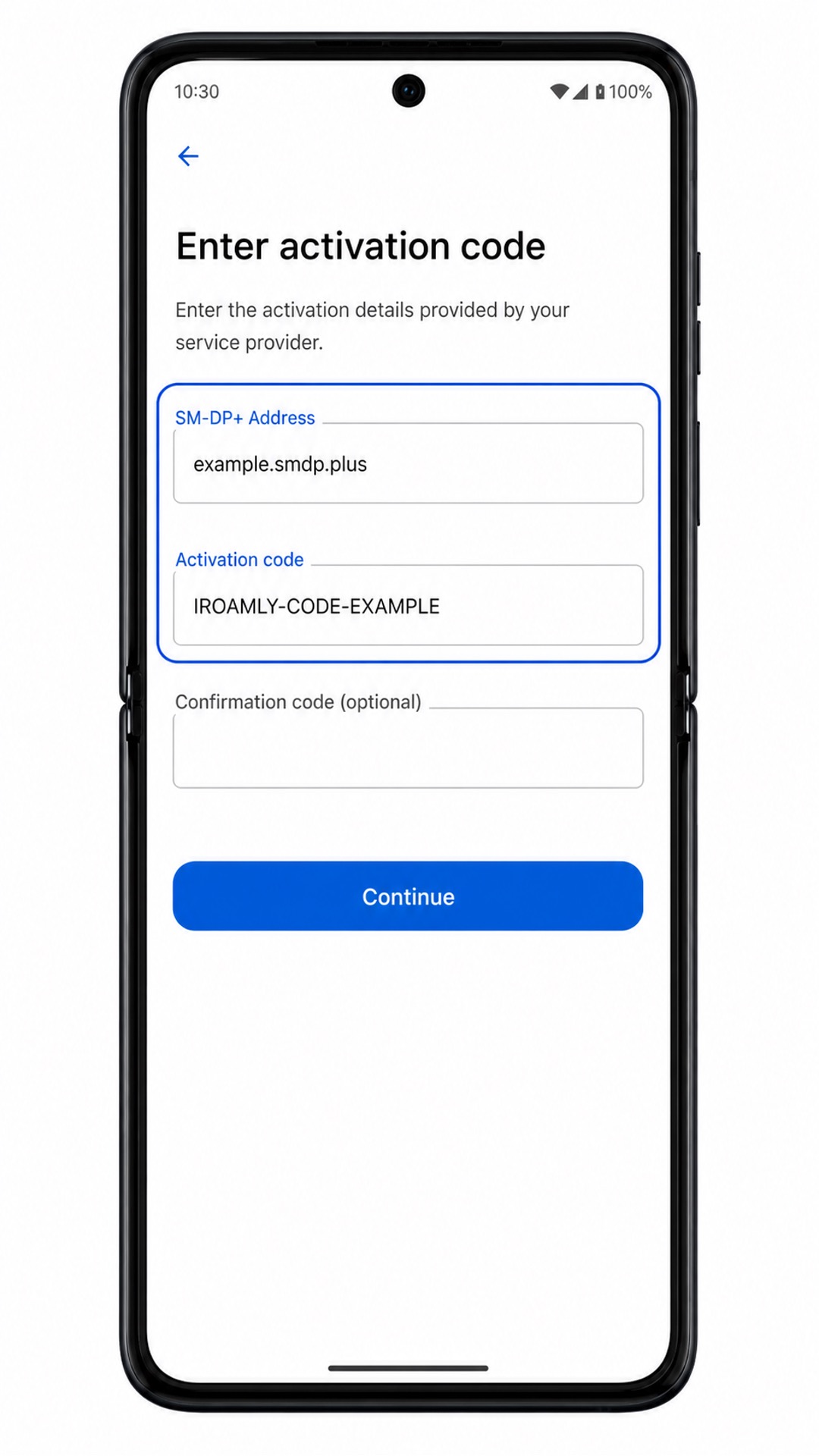
Review the plan information, then tap Download, Activate, or Add. Keep Wi-Fi connected until the Motorola Razr 2022 confirms the eSIM has been downloaded.
How to Confirm Your iRoamly eSIM Is Installed
Go to Settings > Network & internet > SIMs and look for the new downloaded profile. It may appear as iRoamly Travel, the destination carrier profile, or another plan name from your order details.
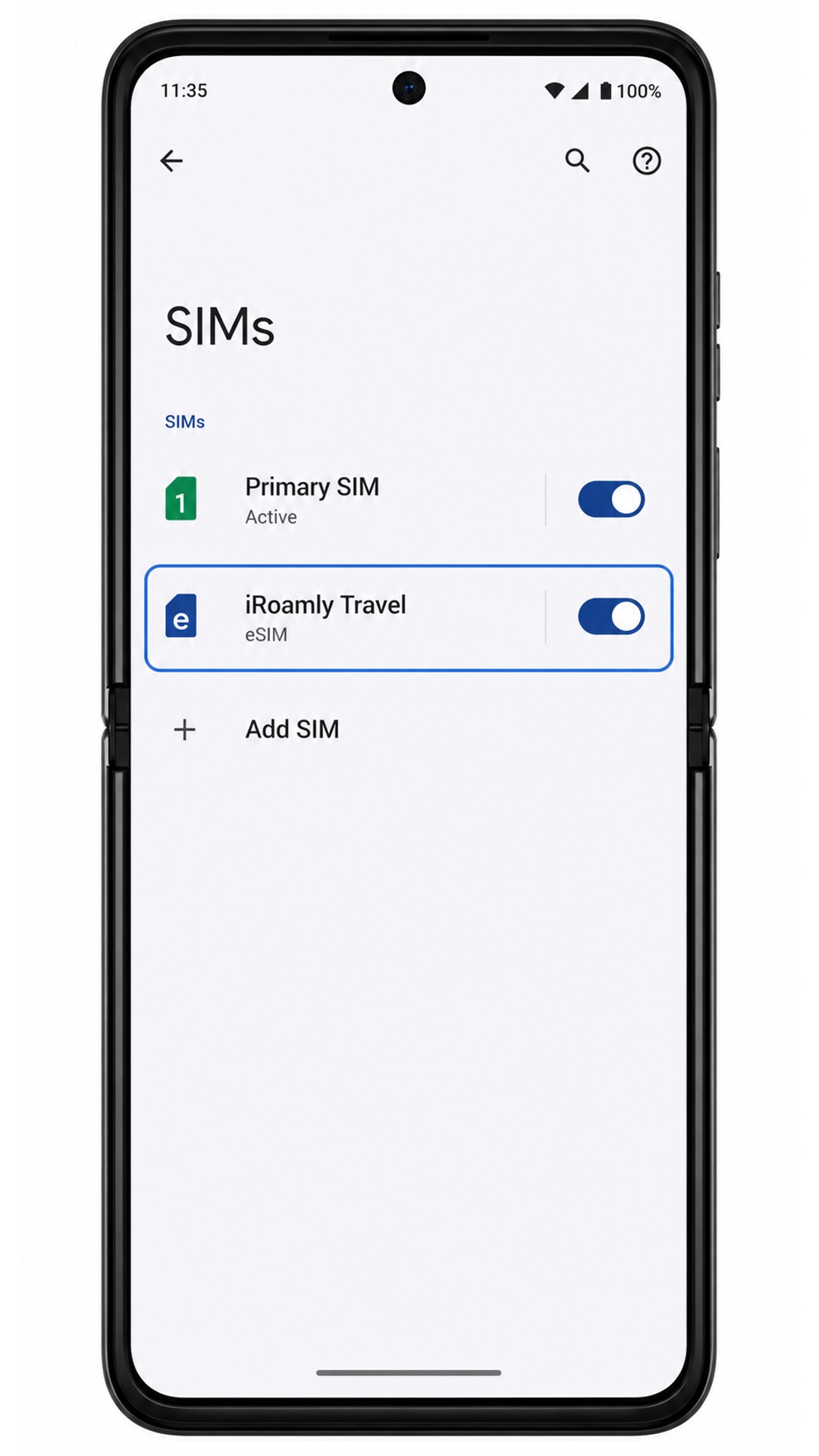
Tap the iRoamly eSIM entry and confirm that Use SIM is switched on. If your plan includes only data, do not expect SMS or voice calling controls to prove service is active.
Configure eSIM for Mobile Data
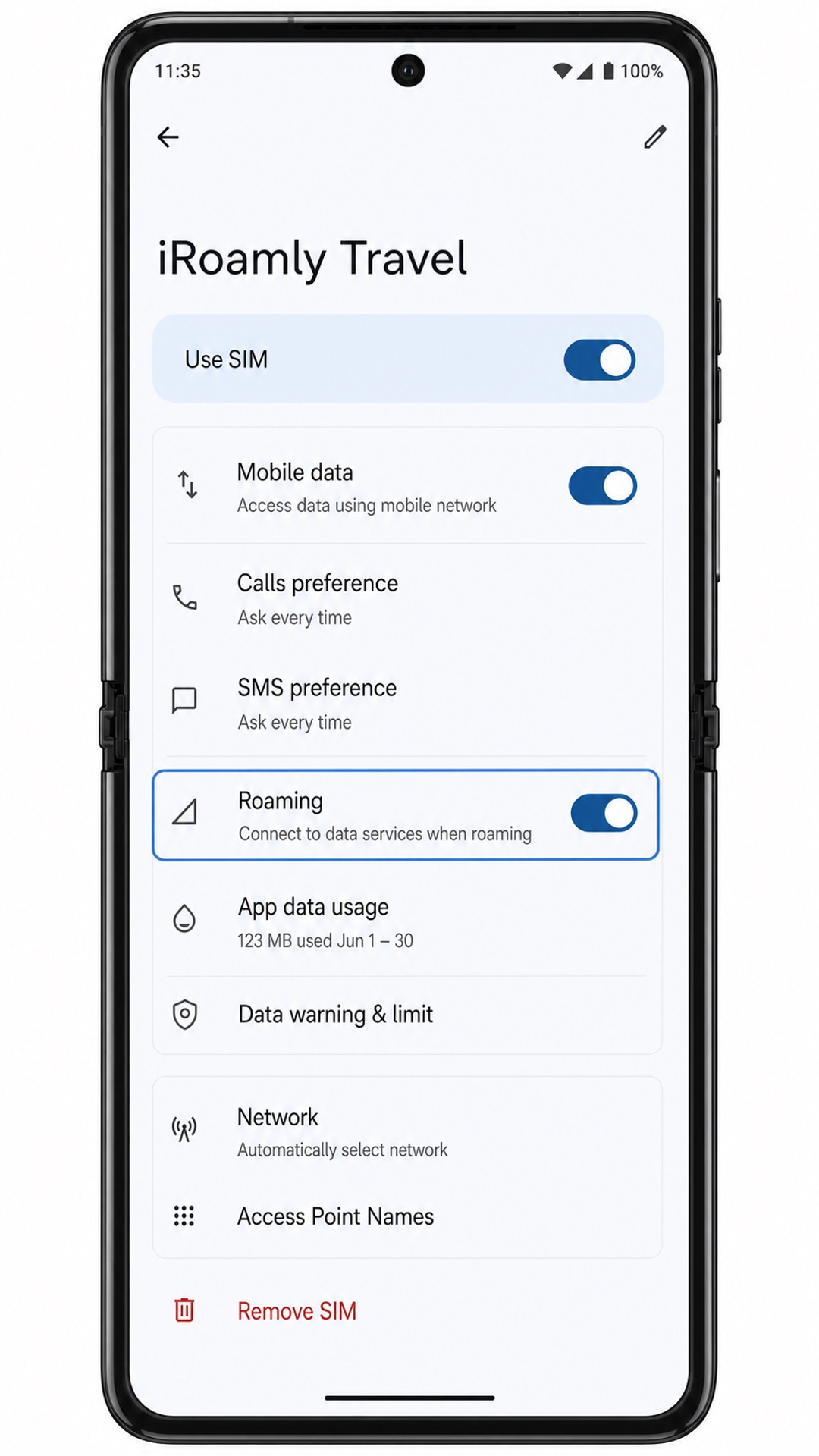
Open Settings > Network & internet > SIMs, then tap the iRoamly eSIM profile. Turn on Use SIM if it is off.
In the same iRoamly eSIM settings page, set Mobile data to the iRoamly eSIM or choose it as the preferred data SIM if Android asks which line should handle data.
Turn on Roaming for the iRoamly eSIM if your destination plan requires roaming. Leave your primary SIM data off or avoid automatic data switching if you want to prevent charges from your home carrier.
Troubleshooting
If Add SIM, Add eSIM, or Download a SIM instead is missing, confirm that your Motorola Razr 2022 variant supports eSIM, install available system updates, and ask your carrier whether eSIM is blocked on your firmware.
If the QR code will not scan, increase screen brightness on the device showing the code, clean the Razr 2022 camera lens, and try again on Wi-Fi. If the QR code is displayed on the Razr 2022 itself, use Method 2 instead.
If Android says the QR code has already been used, do not delete the eSIM. Contact iRoamly support with your order details because many eSIM QR codes are single-use.
If the eSIM stays pending or fails to download, restart the Razr 2022, reconnect to Wi-Fi, and repeat the setup using the same iRoamly details only if the phone did not successfully add the profile.
If the eSIM appears but mobile data does not work after arrival, open the iRoamly eSIM page, confirm Use SIM, select it for Mobile data, turn on Roaming when required, and wait a few minutes for the supported local network to attach.
If you need calls or SMS while traveling, check your specific iRoamly plan. Many travel eSIM products are designed for mobile data and may not include voice or SMS service.
More Motorola Razr eSIM Setup Guides
Setting up another Motorola phone? These eSIM activation guides may help.
Conclusion
For the Motorola Razr 2022, scanning the QR code is usually the quickest path because Motorola's Android flow leads from Network & internet to SIMs, then into the eSIM download screen with only a few taps.
Manual entry is the better fallback when the QR code is on the same phone or the scanner cannot read it, as long as you copy the SM-DP+ Address and Activation code exactly.
After the profile is downloaded, the important checks are in the SIMs page: confirm that the iRoamly eSIM is present, switch on Use SIM, select it for mobile data, and enable roaming when your destination plan requires it.
Once those settings are in place and the plan has activated according to its terms, the Razr 2022 is ready to use iRoamly travel data abroad.